Bitget Review & Tutorial For Canadians – Binance Alternative for Canadians
If you’re in Canada and looking for a crypto exchange, you might have heard about Bitget. It’s been gaining popularity as a Binance alternative for Canadians. I’ve been using Bitget as my main crypto exchange for over a year, and in this Bitget review & tutorial for Canadians, I’ll share everything you need to know.
From low fees to easy deposits, trading options, and even tutorials on buying crypto, this guide has you covered.
Whether you’re a beginner or a seasoned trader, you’ll find this guide helpful. Let’s dive in.
Why Bitget Is Popular In Canada
Bitget stands out for three main reasons:
- Huge Selection of Altcoins – Bitget offers nearly 1,000 altcoins. That’s way more than most Canadian exchanges. Whether you’re into meme coins or trending tokens, Bitget usually has them.
- Low Fees – Trading fees can be as low as 0.1%. That’s almost impossible to beat in Canada right now.
- Easy Deposits & Withdrawals – I’ve never had issues transferring money in or out. Even when big exchanges like Binance and OKX left Canada due to regulations, Bitget worked smoothly.
⚠️ Important: Bitget is not officially available in Ontario and Alberta. Many users still access it, but use it at your own risk. Exchanges usually give time to withdraw funds if they leave Canada.
Quick Bitget Summary
Before we jump into the tutorial, here’s a quick overview:
- Low Trading Fees – One of the lowest in Canada.
- Hundreds of Altcoins – Great for exploring new opportunities.
- Advanced Features – Spot trading, futures, copy trading, bot trading, and more.
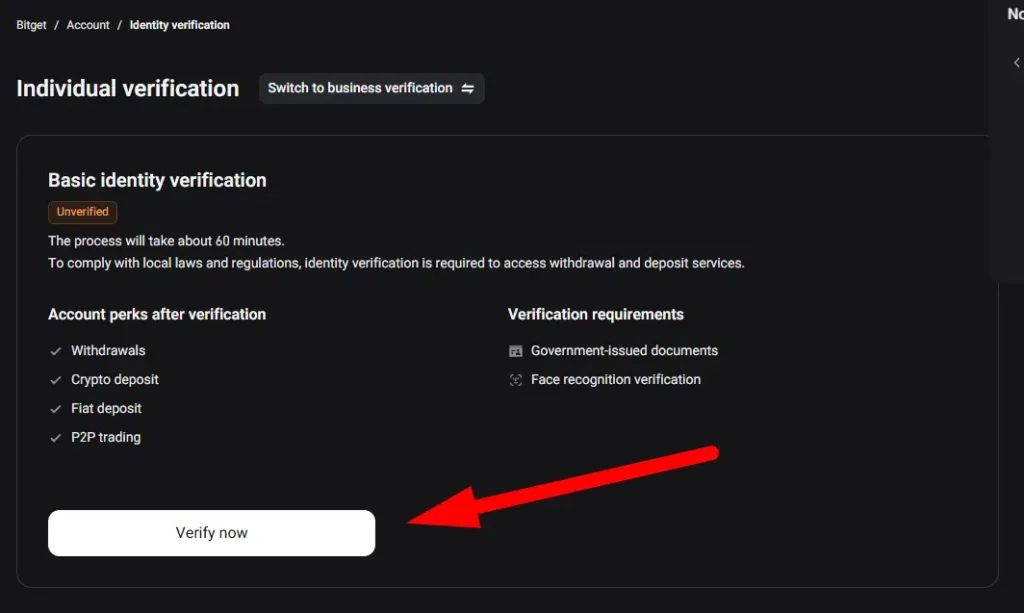
- Simple KYC Process – Bitget asks for ID and selfie verification, which is standard for safety.
- Canadian Dollar Deposits – Not directly supported, but you can use P2P or other exchanges to fund your account.
Signing Up On Bitget
Signing up is easy. You’ll need:
- Email address
- ID document
- Selfie
- Be 18+
Once verified, you’re ready to start trading.
How To Deposit Funds On Bitget
There are two main ways to fund your Bitget account in Canada:
1. Credit/Debit Card
You can buy crypto directly with your card. Fees are high (around 4%), so it’s not ideal.
2. P2P Trading
This is the most popular option. You buy USDT from a seller using Interac e-Transfer. Here’s how it works:
- Choose a trusted seller with high completion rates.
- Enter the amount of CAD to buy USDT.
- Follow seller instructions to send Interac e-Transfer.
- Wait 30 minutes for USDT to arrive in your Bitget account.
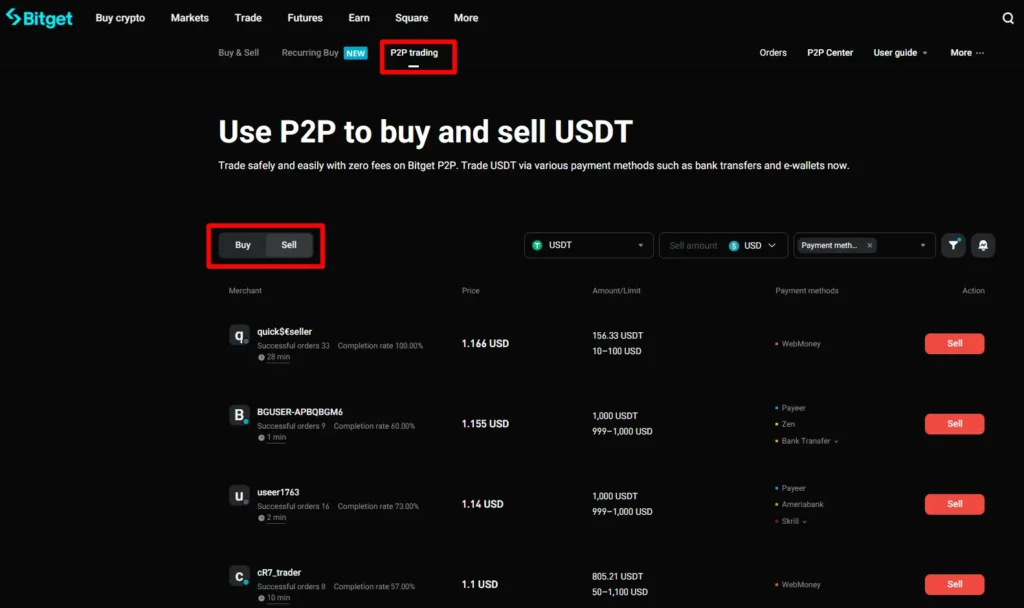
⚠️ This method can be slightly risky, so always check seller history and completion rates.
3. Using Another Exchange (e.g., Coinbase)
Another easy method is to buy USDC on a regulated exchange like Coinbase, then transfer it to Bitget. Steps:
- Deposit CAD on Coinbase via Interac e-Transfer.
- Buy USDC.
- Transfer USDC to Bitget via the correct network (Polygon is recommended).
This method is fast, safe, and beginner-friendly.
Bitget Trading Options
Once your account is funded, Bitget offers multiple ways to trade:
Spot Trading
Spot trading is the most popular. You trade crypto pairs like USDC/Bitcoin.
- Market Order: Buy instantly at the current price.
- Limit Order: Set your own price to buy or sell. The trade executes only if the market hits your price.
Example: Buy TON coin with USDT. Enter your amount, click “Buy,” and you’re done.
Futures Trading
Bitget also allows futures trading, which lets you speculate on crypto price movements. High risk, so only for experienced traders.
Copy Trading
Not familiar with crypto? Copy trading lets you follow experienced traders automatically. They trade, and you mirror their trades. You pay a small commission, but it can be profitable if you choose skilled traders.
Bot Trading & Staking
Bitget also offers bot trading and staking options to earn extra rewards. Most regulated Canadian exchanges don’t provide these advanced features.
Converting USDC To USDT
Many altcoins are only tradable with USDT. Bitget allows zero-fee conversion from USDC to USDT.
Example: Convert 7.2 USDC to 7.18 USDT instantly. Minimal loss, ready for trading popular meme coins.
Security & Safety On Bitget
Bitget takes security seriously:
- Two-Factor Authentication (2FA) – Protect your account with Google Authenticator or SMS.
- Email Alerts – Notify you for logins and withdrawals.
- Insurance Coverage – Emergency fund of $300 million to protect users.
💡 Tip: Keep most crypto in a private wallet (like Ledger, Trezor, or SafePal). Only leave what you need for trading on Bitget.
How to Trade on Bitget: A Beginner’s Guide
The trading screen can look complex. Don’t be scared. Let’s keep it simple.
The Easiest Way: Convert Your Coins
Do you have USDC but want USDT? USDT has more trading pairs on Bitget.
Use the “Convert” tool. It is fast and has zero fees.
Just pick USDC, choose to convert to USDT, and confirm. It’s that easy.
Spot Trading: Buying and Selling Coins
This is the most common way to trade.
- Click on “Spot Trading.”
- At the top, choose your trading pair. If you have USDT, select a pair like TON/USDT (TON Coin is a popular one).
- You will see a price chart.
- Below the chart, you see the “Buy” box.
- For the simplest trade, use a “Market” order. This means you buy at the current best price.
- Enter the amount of USDT you want to spend.
- Click “Buy TON.”
Boom! You now own the crypto. It is that simple.
What is a Limit Order?
A limit order lets you set a specific price. The trade only happens if the market hits that price.
For example, you want to buy Bitcoin, but only if it drops to $54,000. You can set a limit order. If the price falls to that level, Bitget will automatically buy it for you.
This is a powerful tool in a volatile market.
Cool Bitget Features You Won’t Find in Canada
This is where Bitget really shines. Most regulated Canadian exchanges don’t offer these.
Copy Trading
Are you new to crypto? You can copy the trades of experts.
Bitget shows you the most successful traders. You can see their return on investment (ROI). You can click “Copy” and the system will automatically mimic their trades.
You pay a small fee to the expert trader. It is a great way to learn and potentially earn.
Futures Trading
Futures trading is not allowed on many Canadian platforms. It is on Bitget.
I don’t use it much. It is very high-risk. But if you are an experienced trader, you have the option.
Earn & Staking
You can earn interest on your crypto. Bitget has staking and savings products. You can put your idle assets to work.
Is Bitget Safe? Security Tips
Security is everything in crypto. Bitget takes it seriously.
- 2-Factor Authentication (2FA): You must enable this. Use an app like Google Authenticator. It adds a vital layer of security.
- Withdrawal Alerts: Bitget will email you every time someone logs in or tries to withdraw funds.
- Insurance Fund: Bitget has a $300 million insurance fund to protect user assets.
But remember the golden rule of crypto: “Not your keys, not your coins.”
If you are not actively trading, move your crypto to your own wallet. I use a Ledger or Trezor. This is the safest way to store your investment.
Keeping everything on an exchange, even a big one like Bitget, has risks. We all saw what happened to FTX.
Pros & Cons of Bitget
✓ The Pros
- Very low fees
- Massive selection of altcoins and meme coins
- Powerful features like copy trading
- Generally reliable and secure
✗ The Cons
- There is a regulatory risk. They could leave Canada someday
- No direct CAD deposits. You need to use P2P or another exchange
- The platform can be overwhelming for absolute beginners









Post Comment