How to Protect Your Coinbase Account & Verify It’s Safe in 2026
Staying safe in crypto is a full-time job now. Scammers are smarter. Tricks look real. And many users fall for fake Coinbase alerts every day.
So today, I’m breaking it all down in simple words.
This guide will show you:
- What Coinbase scams look like
- How scammers trick you with fake alerts and calls
- How to avoid every scam tactic
- How to verify your Coinbase account is actually safe
- The right way to secure your login, passwords, and wallet
Everything here comes directly from real user experiences and common scam attempts.
What Is the Coinbase Scam?
Coinbase scams usually start with a fake alert.
It may look like:
- “Did you request a password reset?”
- “Your account is locked.”
- “Your funds are at risk. Please verify now.”
These alerts come from scammers pretending to be Coinbase Support.
Their goal is simple: get access to your Coinbase account.
Once they have access, they drain everything.
The Real Example That Sparked This Warning
A user shared his story on Reddit. It’s the perfect example of how these scams work.
Here is what happened:
- He received a text message claiming to be from Coinbase.
- The text asked: “Did you change your password?”
- He replied NO, which told the scammer he was active.
- Minutes later he received a phone call from someone pretending to be Coinbase Support.
Luckily, he stopped before giving any info.
But many users don’t.
And scammers know that when you react out of fear, you stop thinking clearly.
Common Tricks Scammers Use
Scammers follow the same blueprint:
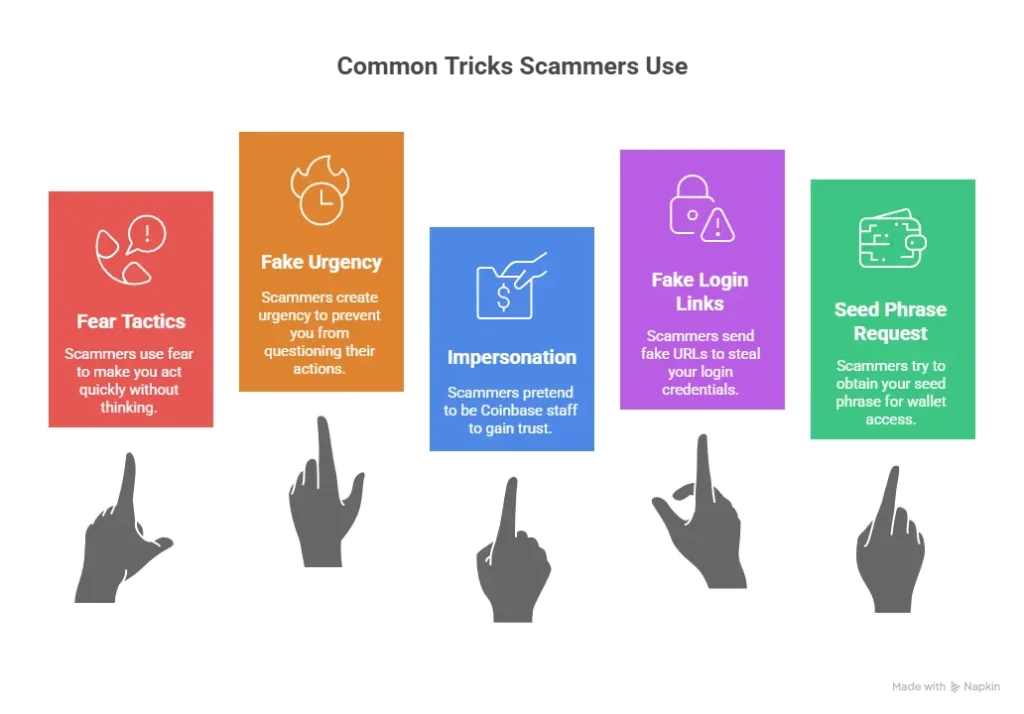
1. They use fear.
They want you scared.
Messages like:
- “Your account is compromised.”
- “Your funds will be lost in minutes.”
- “We locked your account for your safety.”
Fear makes you act fast.
Scammers count on that.
2. They use fake urgency.
They say things like:
- “Act within 10 minutes.”
- “We must verify your identity right now.”
- “Reset your account immediately.”
Urgency stops you from thinking.
3. They pretend to be Coinbase staff.
They speak politely.
They know crypto terms.
They sound professional.
But remember this rule:
Coinbase will never call you. Ever.
If someone calls you, it’s a scam.
4. They send fake login links.
This is the dangerous part.
Scammers send URLs like:
- coinbase․com (with a dotless Turkish “i”)
- coinbase-support․com
- coinbasehelp․net
- c0inbase․com (with a zero)
- coinbase-security․co
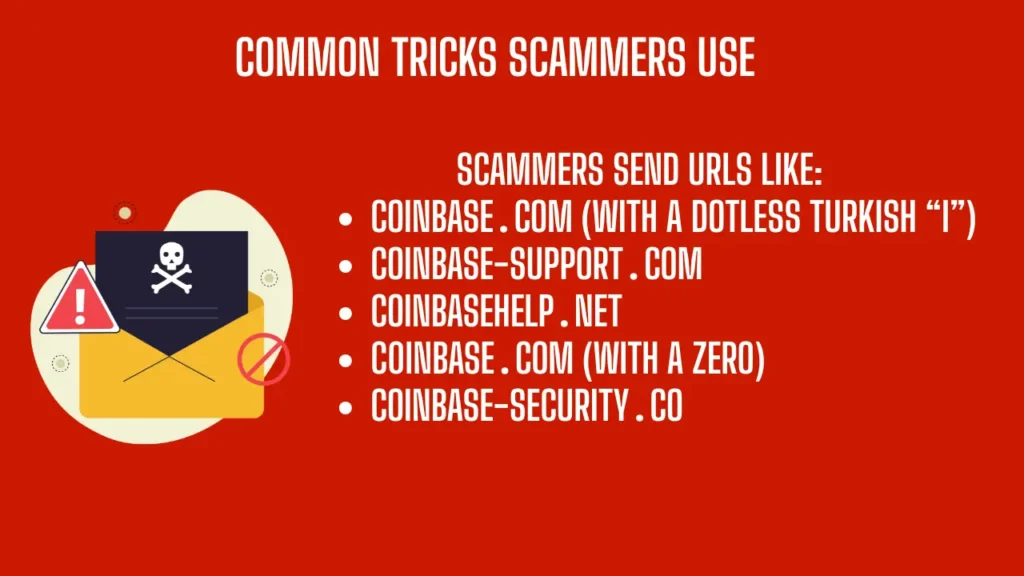
They look real, but they’re not.
Clicking them steals your login.
5. They try to get your seed phrase
If you mention you have a Ledger, Trezor, or any hardware wallet, scammers switch tactics.
They will say:
- “Your Coinbase wallet needs re-verification.”
- “Transfer your assets to your secure wallet.”
- “We need your recovery phrase to reset your Coinbase wallet.”
Never give your seed phrase to anyone.
Not even Coinbase.
Coinbase will never ask.
How to Avoid All Coinbase Scams
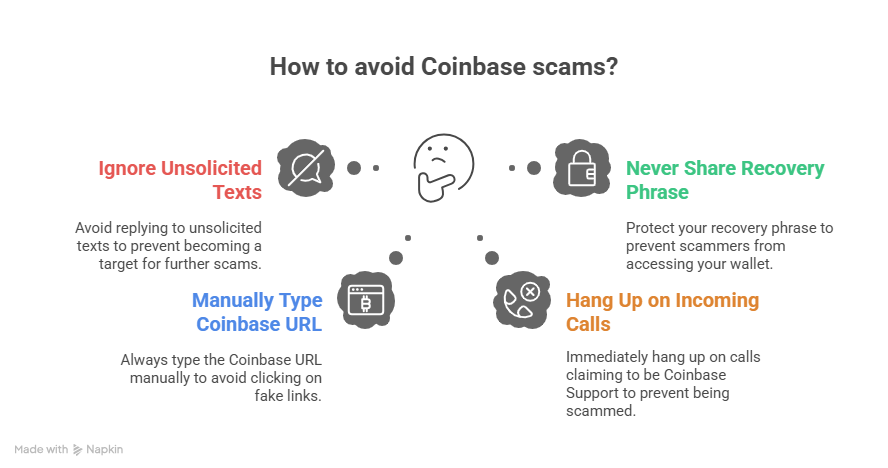
Rule #1: Never reply to unsolicited texts
If you did not request a password change, and you get a text saying you did, ignore it.
Your iPhone or Android gives you an option:
- Report Junk
- Delete
- Block Sender
Do all three if possible.
Why?
Because replying tells the scammer your number is active.
That makes you a target for:
- Scam phone calls
- More scam texts
- Advanced phishing attacks
Rule #2: Never click ANY link that claims to be Coinbase
Scammers want you to tap a fake link.
Examples:
- “Fix account issue”
- “Unlock your account now”
- “Verify identity for your safety”
Never click these.
Instead, do this:
Always type coinbase.com manually or use your saved bookmark.
This is your #1 defense.
Rule #3: Never trust incoming calls
Coinbase does not call users.
Not for:
- password issues
- security alerts
- blocked withdrawals
- locked accounts
- verification requests
If someone calls you claiming to be Coinbase Support:
Hang up. Immediately.
Don’t argue.
Don’t explain.
Just hang up.
Rule #4: Never share your recovery phrase
If a scammer learns you have a Ledger or hardware wallet, they switch plans.
They pretend to “help” you move assets.
Then they ask:
- “Can you read your recovery phrase so we can sync your wallet?”
- “We need the seed phrase to verify ownership.”
- “Without your 24 words, we can’t recover your account.”
This is 100% fake.
Your seed phrase = your entire wallet.
Once someone has it, all your crypto is gone.
How to Check If Your Coinbase Account Is Safe
This is key.
If you ever feel worried…
If you ever get a strange text…
If you ever see a weird alert…
Do this simple check.
Step 1: Go to Coinbase.com manually
Either:
- Type it yourself, or
- Click your saved bookmark
Do NOT use:
- email links
- text message links
- pop-up links
- Google ads
Only go direct.
Step 2: Try to log in
If your password works:
- Your account is fine
- Your funds are safe
- Nobody changed anything
If your password does NOT work:
- Someone may have hacked your login
- Your account might be compromised
- You must contact Coinbase Support immediately — using the official website
Step 3: Check for real Coinbase alerts
Once inside your account:
- Coinbase will show real alerts
- Coinbase will show if your password was changed
- Coinbase will show if unusual activity happened
If Coinbase does not show a real alert, then the message you received was fake.
Step 4: Check your balances
If you can see your funds, they are safe.
If anything is missing, open a support ticket immediately from the Coinbase website.
How Your Password Strategy Could Be Hurting You
Some users make a mistake thinking they are being “extra secure.”
They do things like:
- Typing the password manually every single time
- Making it extremely long but hard to remember
- Changing it too often
- Using a password they forget easily
This actually causes more problems.
You may:
- mistype your password
- lock yourself out
- trigger login reset emails
- panic and react to fake alerts
Use a password manager instead
Recommended options:
- 1Password
- Dashlane
- Bitwarden
- Keeper
These tools:
- store your password securely
- save you from typing errors
- autofill only on the real Coinbase.com
- protect your vault with encryption
Using a password manager makes your Coinbase login safer and easier.
What About Coinbase Passkeys?
Coinbase now supports passkeys, which are much easier to use.
Passkeys authenticate using your device instead of a password.
That means:
- no typing
- no password leaks
- no phishing
- no keyloggers
- no scam website stealing your login
You can also use:
- Google Authenticator
- Authy
- YubiKey (physical hardware key)
These make your login extremely safe with almost zero effort.
What Scammers Do When You Respond to a Text
This part is important.
The Reddit user got scammed because he responded “NO” to the message.
Why does this matter?
When you reply:
- You confirm the phone number is active
- You confirm you are a Coinbase user
- You confirm you care about your account
- You confirm fear can trigger your response
This puts you into the scammer’s “High Value Target” list.
That’s why he received the scam phone call right after.
The scammer knew:
- the user replied
- the user was worried
- the user might answer a call
- the user could be tricked more easily
This is why Rule #1 is so important:
Never reply to a scam text.
Just delete, block, and report.
Signs That a Coinbase Alert Is 100% Fake
Here is a quick list.
If you see any of these, it is fake.
- The domain has strange letters
- The email “from” address is not from @coinbase.com
- The message has grammar errors
- The message says “urgent action needed”
- The message says “verify your identity immediately”
- The message offers a reward
- The message threatens account loss
- The message says “call this number”
- The message says “your account will be drained”
Coinbase never sends messages like these.
Coinbase Will NEVER Ask for These Five Things
If someone asks for any of these, it is 100% a scam.
- Your password
- Your seed phrase
- Your 2FA code
- Remote access to your phone or computer
- Your private keys
No exceptions.
No “verification reason.”
No “security reset.”
No “emergency.”
Never share these with any person, support agent, or official-looking caller.
How to Make Your Coinbase Account Unhackable
1. Use a password manager
Strong, random, 20-character password.
2. Turn on passkeys
This blocks 99% of phishing scams.
3. Enable 2FA (Google Authenticator or YubiKey)
Avoid SMS codes.
SMS can be hacked.
4. Bookmark Coinbase.com
Never click random links again.
5. Review your login history often
Coinbase shows:
- IP addresses
- Device names
- Login attempts
If something looks wrong, lock your account immediately.
6. Set up “Device Verification” alerts
Coinbase will notify you every time a new device logs in.
What To Do If You Suspect a Scam
Follow this checklist:
1. Do NOT panic.
Panicking makes things worse.
2. Go to Coinbase directly.
Use the bookmark or type the address manually.
3. Try to log in.
If login works, your account is safe.
4. Check balances and recent activity.
If nothing changed, you’re fine.
5. Change your password (optional)
Do this only if you feel uneasy.
6. Enable passkeys if you haven’t already
7. Open a support ticket only through Coinbase.com
Never through links sent to you.
Why Coinbase Will Never Contact You First
Coinbase has millions of users.
They do not have time to:
- call
- text
- message
- DM
- Telegram
- Facebook message
any customer first.
They only respond when you contact them.
So if you receive:
- a call
- a text
- an email
- a message
claiming to be from Coinbase Support…
…it is 100% fake.
Every time.
Final Thoughts: Stay Calm, Stay Safe, and Check Things Yourself
Crypto scammers rely on one thing: your fear.
But now you know the playbook.
You know:
- how they attack
- what they say
- how they try to fool you
- how to check your account
- how to stay safe
- how to secure your login
- what Coinbase will never do
Here is the golden rule:
If you ever think there’s a problem, just log in to Coinbase directly.
If your account works, you’re safe.
Simple. Calm. Effective.
Protect your crypto.
Protect your login.
Protect your recovery phrase.
Stay safe out there.









Post Comment